


how to add risk reward ratio in Tradingview 2025
In this article we will show you how to use the Risk-Reward tool in the Trading View and how to add it to your chart. In previous articles we have talked about the importance of risk and reward, and as you know, using the right risk and reward can make you profitable. Using this tool allows us to easily understand our profit-loss ratio in each trade and we can manage our capital and risk.
How to add risk and reward to the chart in TradingView
You can select Risk and Reward Tools from the toolbar on the left side of your chart in the Trading View in the Forecasting and Measurement Tools section.
The Risk and Reward Ratio tool in the Trading View includes two models
1_ Risk-Reward tool suitable for long positions
In this model of the risk/reward tool, the reward is displayed in the upper part of the tool and our risk is displayed in the lower part of the tool on the chart.
2_ Risk-Reward tool for short positions
But in this model, the reward is displayed in the lower part and the risk is displayed in the upper part of this tool on the chart.
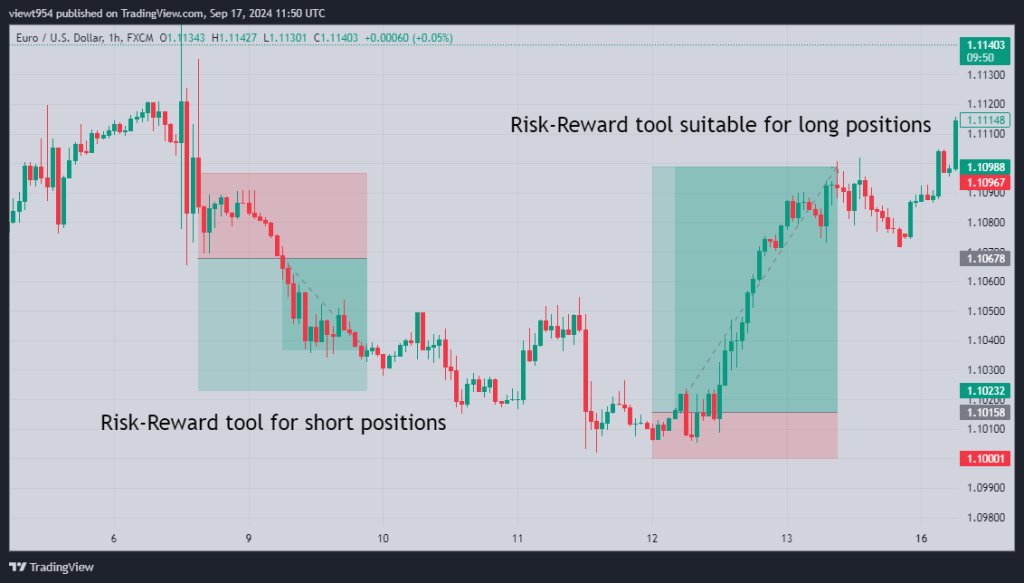
Photo by Trading View website
As you can see in the image above, we used risk and reward tools for our buy and sell positions.
By using this tool, we were able to determine our risk percentage and profit percentage in each position, which allows us to perform better in capital and risk management.
What happens if we do not use risk and reward tools in our trades?
The first requirement for growth and success in any business is capital management, if you don’t know how much of your capital you are risking and how much profit you will make on every trade you make, you can never be successful in risk and capital management, and it will cause you to suffer losses and lose your capital by taking unreasonable risks.
We hope you enjoyed this article.