



How to clear tradingview chart from indicators
Sometimes the presence of many indicators on the chart makes us unable to properly focus and perform our technical analysis, a clean chart allows us to properly see market movements including trends and cycles. Also, sometimes we want to remove the indicators we have added to the chart to use new indicators. In many cases, we have added too many indicators to our chart and removing them one by one can be a tedious task. In this article we want to learn how to easily and quickly remove all indicators from the chart and clean our chart.
How to remove all indicators from the chart simultaneously?
To remove all indicators from your TradingView chart, right-click on the chart and select the “Remove [n] Indicators” or “Remove Indicators” option. This will clear all indicators and give you a clean chart. The “[n]” in “Remove [n] Indicators” represents the number of indicators currently on your chart, showing exactly how many indicators will be removed.
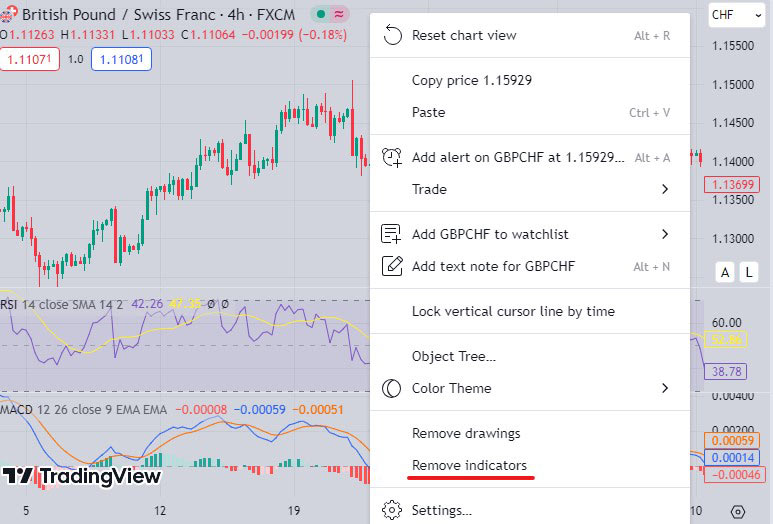
Photo by TradingView
As you can see in the picture above, we have two indicators MACD and RSI in the chart above, which made our chart a little crowded and we used the “Remove Indicators” option to remove them.
See the photo below
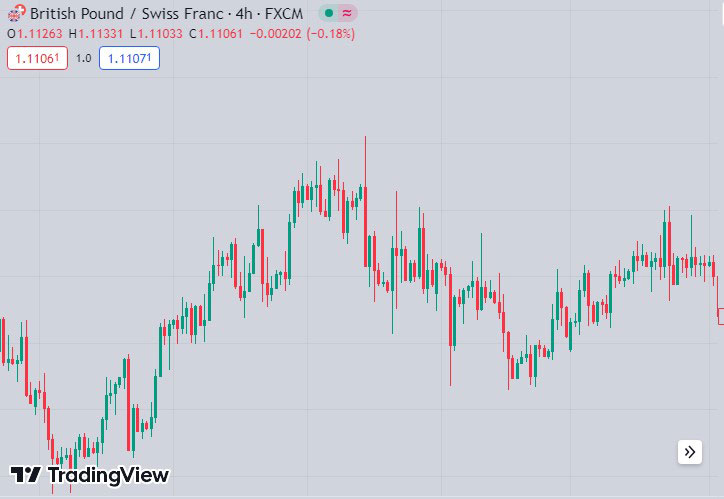
Photo by TradingView
As you can see in the image above, after using the “Remove Indicators” option, our chart is completely clean and ready for technical analysis or the addition of new indicators.
We hope you enjoyed this article.