



How to get Tradingview premium account 2025
The Trading View website and application is one of the best places to analyze the financial markets. This website has made analysis easy for traders by providing hundreds of professional and excellent tools and indicators. By using these tools and indicators, we can analyze the chart better and more accurately and ultimately increase the Win Rate of our strategies. However, in order to use some indicators and tools, as well as many settings and other things, you need to upgrade your account.
Many people who are new to TradingView do not know how to upgrade their account and benefit from all the features of this site. In this article we will learn how to upgrade our TradingView account to a premium account.
Trading View account upgrade steps
To upgrade your account, go to the home page and click the Upgrade Now option at the top of the page.
Clicking on this option will take you to the Account Upgrade page.
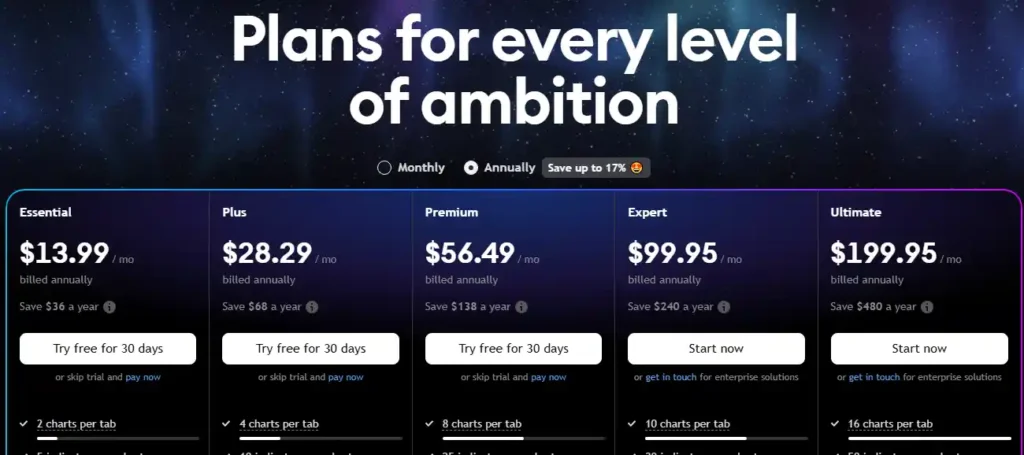
Photo by TradingView
Types of TradingView account models
1_Essential
2_Plus
3_Premium
4_Expert
5_Ultimate
Essential, Plus and Premium accounts are in the non-professional category , and Expert and Ultimate accounts are in the category of professional accounts that you can choose any account according to your needs.
You can also purchase and use these accounts on an annual or monthly basis. As you can see, if you purchase an annual subscription for each account, you can also use special discounts for annual purchases. In the table at the bottom of this page, you can see all the features and options of each account and choose the one that best suits your needs.
We hope you enjoyed this article.