



How do I save an image from Tradingview chart ?
TradingView is one of the best sites in the world for technical analysis of the financial markets, including forex and cryptocurrency, which has many tools and indicators and also offers many services to its users. One of the interesting features of TradingView that we want to talk about today is the ability to take a snapshot of the chart. This option allows you to download your chart image quickly and easily.
In this article we will learn how to download the image of our chart in TradingView or take a snapshot of it. By learning this feature of TradingView, you will no longer need to use other applications to take a screenshot of your screen.
How to take a snapshot and download the chart image from TradingView
On the right side of the screen, above your watchlist, there is a toolbar with several options, the snapshot icon is displayed like a camera, as you can see in the image below. Clicking on the Take a Snapshot icon will open a small window called Chart Snapshot, in this window click on the Download Image option to download the chart image.
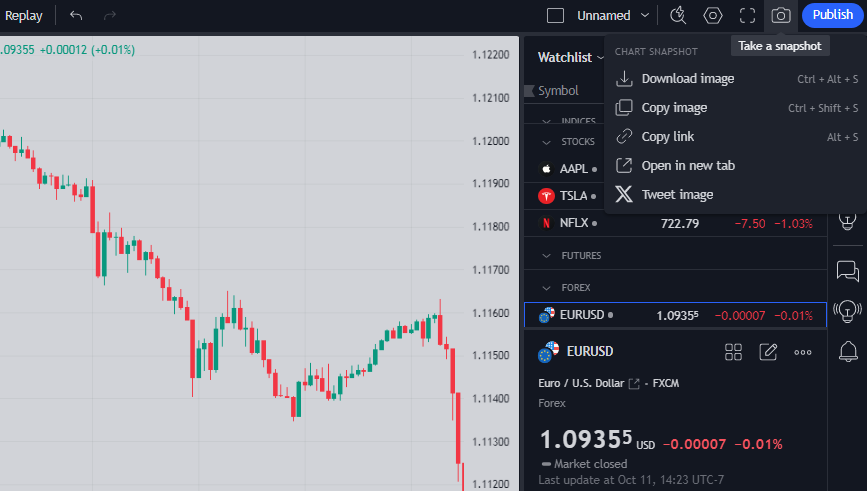
Photo by TradingView
By downloading the image of your chart, you can analyse it at any time, check your analysis or even share it with others. Also, the images you download from your chart are saved in PNG format and are of acceptable quality, and all the details of the chart are well visible.
We hope you enjoy this article