


How to Change Color Theme in TradingView?
Trading View is the best website for analysis and review of the financial markets, which provides its users with many tools and indicators. Today we want to learn how to customize and change the color of the chart in Trading View, the color of the chart is very influential in the quality of the trader’s analysis, and today we want to learn which color is the right color for the background of our chart and how to change it.
Best colors for background chart in TradingView
The default color of the chart in the trading view is white, on the white background you can see very good details, and white color is one of the colors that make your mood happier. However, in long-term use and with a lot of light on the phone or computer screen, white color can be harmful to the eyes.
Our suggested color is light gray, because the details are easy to see in it, and it does not hurt the eyes for a long time, Black color also has an interesting position for the chart background and many traders use it, but it can be boring for many traders.
All 3 colors, white, black and gray, are common colors for chart backgrounds and are popular colors for traders in the financial markets. You should choose the color for your chart according to your taste.
How do I change the background color?
Go to your chart in the trading view and right click on the chart to open a small window on the chart, on computers and laptops you can access the settings and options on the chart by right clicking on the chart, Then click on the Settings option. As shown in the picture below
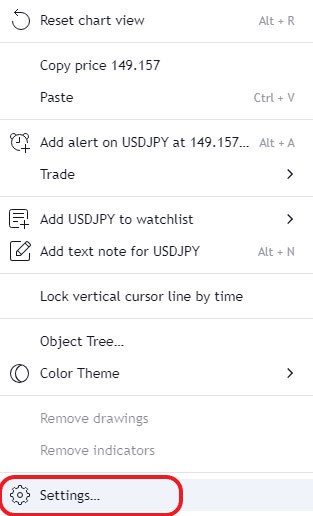
Photo by Trading View
You are now on the Chart Settings page. Click on the “Canvas” option and then click on the colors icon in the “Background” section. By clicking on the colors icon, you can choose any color you want for your chart. As shown in the picture below
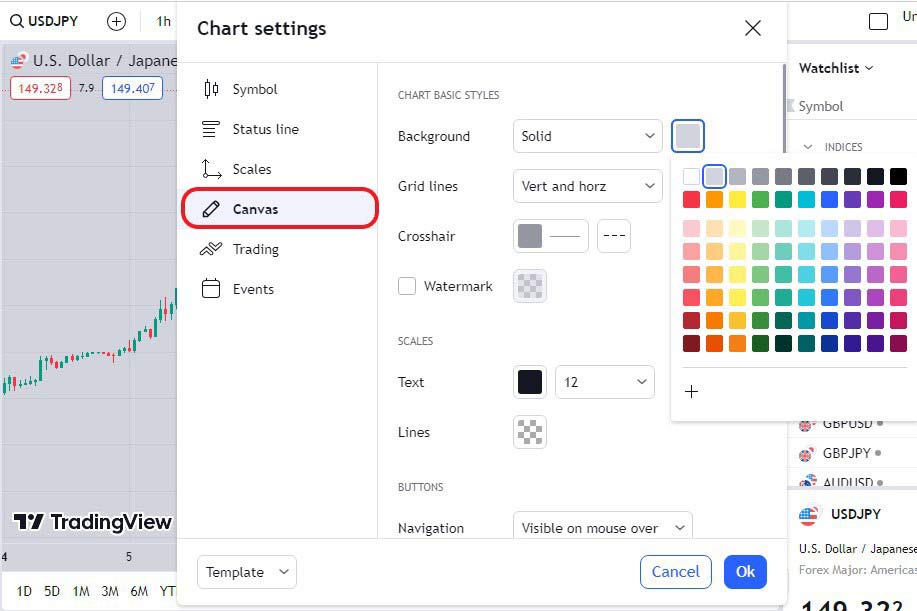
Photo by Trading View website
In the picture above you can see the chart settings window. Here we can choose any color we want for our chart. By choosing your favorite chart colors, you can analyze more comfortably, enjoy the charting environment, and boost your mood. We hope you enjoyed this article.